
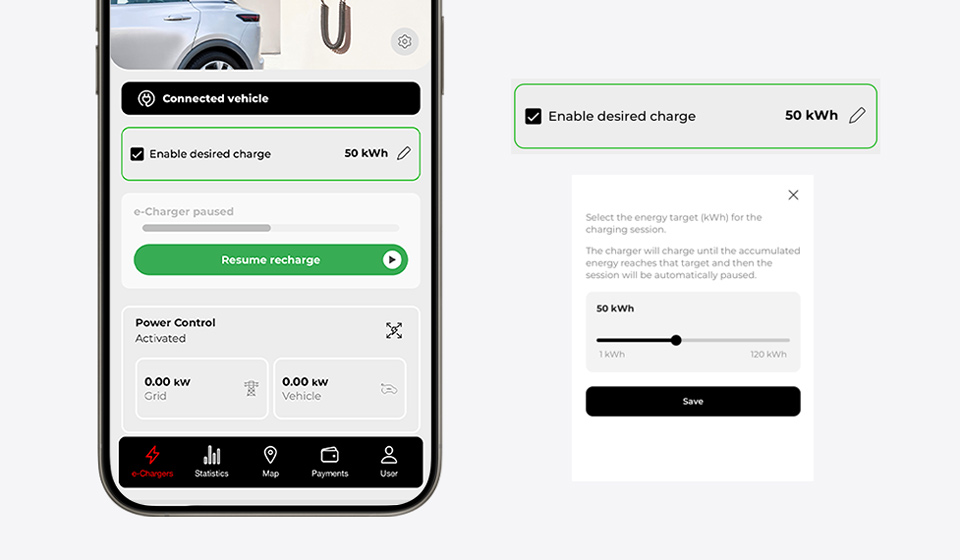
At V2C, we continue to advance to offer you increasingly precise control over the charging of your electric vehicle. Therefore, we have incorporated a new feature in our app available for Trydan and Trydan Pro chargers: the ability to choose how much energy you want to charge.
Now, you simply select, for example, 30 kWh, and the charger takes care of everything: it supplies exactly that amount of energy and automatically stops charging when it reaches it.
Table of Contents
What is target charging and why is it key?
Target charging is an advanced feature that allows you to define the exact amount of energy you want to transfer to your vehicle, rather than relying solely on time or charging power.
This translates to much more precise and efficient control of the process. You decide the energy, and the system automatically executes the charging until that goal is met.
Advantages of target energy charging
This new feature brings clear benefits in daily life:
- Total precision: charges exactly what you need, no more, no less.
- Greater energy efficiency: avoids unnecessary consumption and optimizes each charging session.
- Expense control: ideal for limiting costs or adapting to variable electricity rates.
- Convenience: forget about having to manually stop the charging.
Compatibility with other features
Target charging is designed to seamlessly integrate with the rest of the features of the V2C app:
- Dynamic power control: adjusts the load based on the consumption of your home or facility.
- Time scheduling: combines target energy with time slots to maximize savings.
How to activate target charging
Activating this feature is very simple. To do this, it is mandatory that the firmware version of your Trydan or Trydan Pro charger is 2.4.3 or higher.
- Access the V2C app.
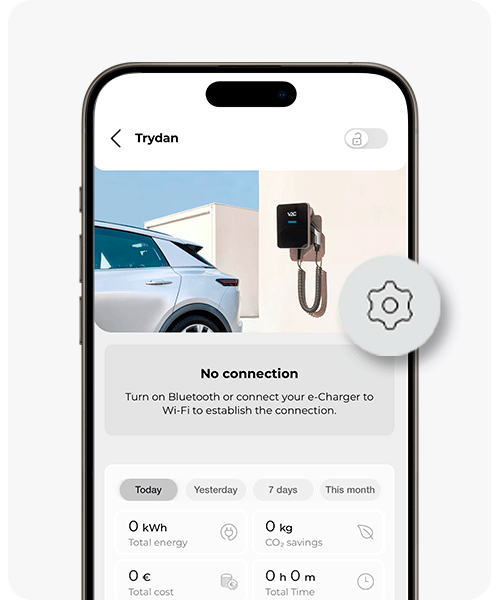
- Select your charger.
- Click on the Settings icon.
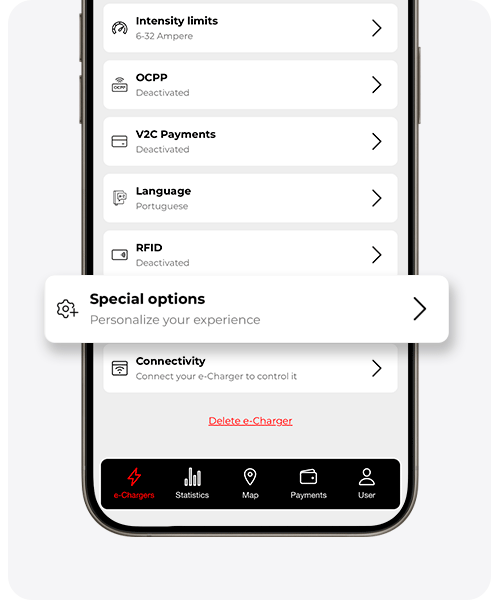
- Scroll down to Special Options.
- Activate the View charging target option.
- Once activated, return to the main page of your e-Charger, enable the desired charging and enter the amount of kWh you wish to charge.
From that moment on, the charger will automatically manage the process until the defined energy is reached.
If you have questions about the setup or operation of the app, visit the complete guide on V2C Cloud.
Can it be used to charge up to a percentage?
Although this functionality works directly in kWh and not in battery percentage, you can use it to easily approximate a specific charge level (like 80%).
You only need:
- Know the current battery percentage.
- Know the total capacity of your vehicle.
- Calculate the energy needed to reach the desired level.
Example:
If your battery is 60 kWh and you are at 50%, you will need approximately 18 kWh to reach 80%.
Considerations to Keep in Mind
Target charging is based on estimates, so there may be small variations due to factors such as:
- Energy losses during charging
- Real vehicle consumption
- Installation conditions
Still, it is a very useful and practical tool to efficiently reach your charging goal.