
How to connect and configure the MID meter on Trydan/Trydan Pro
The MID meter is an electrical measuring device that meets the requirements set by the European Directive 2014/32/EU, known as the MID (Measuring Instruments Directive).
MID meters allow accurate recording of the energy consumed during electric vehicle charging, especially when certified measurement is required for billing purposes. Thanks to their MID certification, these meters enable operators, companies, and individuals to ensure transparency in the billing of electricity consumption.
In addition to their use in electric vehicle chargers, MID meters are used in industrial, commercial, and residential installations where accuracy and traceability of energy data are crucial.
Compatible meters
- Single-phase: CHINT DDSU666. In some documents, it appears as DSSU666; check the reference on your meter’s label.
- Three-phase: CHINT DTSU666.
- Other models: consult the manufacturer’s technical data sheet to identify the equivalent terminals to those indicated in this guide.
Compatible chargers
- Trydan
- Trydan Pro
⚠️ Attention: the mains voltage is dangerous. Before touching any wires, disconnect the circuit breaker that powers the charger and check that there is no voltage. The installation must be carried out by a qualified electrician and comply with local regulations.
About the terminal numbers: the numbers in this guide are the ones that are usually printed on these meters. Before tightening any cable, always compare them with the markings on your meter and with the diagram on its side label.
1. Electrical connection of the MID meter
The MID meter is installed in series with the line that powers the charger and measures the energy delivered to the charger. All the current going to the charger must pass through the meter.
Single-phase meter (DDSU666)
| Terminal | Connection |
|---|---|
| 1 | Phase input (L), from the circuit breaker |
| 2 | Phase output (L), to the charger |
| 3 | Neutral input (N), from the grid |
| 4 | Neutral output (N), to the charger |
- Disconnect the circuit breaker that powers the charger.
- Connect the phase coming from the switch to terminal 1.
- Connect a phase cable from terminal 2 to terminal L of the charger.
- Connect the neutral coming from the grid to terminal 3.
- Connect a neutral wire from terminal 4 to terminal N of the charger.
- The earth cable (PE) does not go through the meter: connect it directly from the network to the charger.
- Make sure all screws are tightened properly and check that no bare copper is exposed outside the terminals.
Three-phase meter (DTSU666), direct connection to 4 wires
| Terminal | Connection |
|---|---|
| 1 | Phase L1 input, from the circuit breaker |
| 2 | Phase L1 output, to the charger |
| 3 | Phase L2 input, from the circuit breaker |
| 4 | Phase L2 output, to the charger |
| 5 | Phase L3 input, from the circuit breaker |
| 6 | Phase L3 output, to the charger |
| 7 | Neutral (N), from the grid |
- Disconnect the circuit breaker that powers the charger.
- Connect L1, L2, and L3 from the switch to the terminals 1, 3, and 5.
- Connect terminals 2, 4, and 6 to terminals L1, L2, and L3 of the charger.
- Connect the neutral to terminal 7 and also bring the neutral to terminal N of the charger.
- Connect the earth cable (PE) directly from the network to the charger, without going through the meter.
- Tighten all screws and check the phase order and the tightness of the cables.
Important: respect the input and output sides and maintain the same phase order (L1, L2, L3) in the meter and in the charger. If an input and an output are swapped, the meter will register negative (reverse) energy.
If you use a three-phase meter in a single-phase installation, connect the phase to L1 (terminals 1 and 2) and the neutral to terminal 7. Then, select the type of meter you have installed on the charger (see section 4).
Chargers with factory-integrated MID meter
If the MID meter is installed inside the charger, it is powered by the phase coming out of the protection block. As seen in the image, the neutral (blue wire) enters and exits through the upper connectors of the meter, and the phase L1 enters and exits through the lower connectors. The communication goes to the connector CON6 (A and B) on the power board.
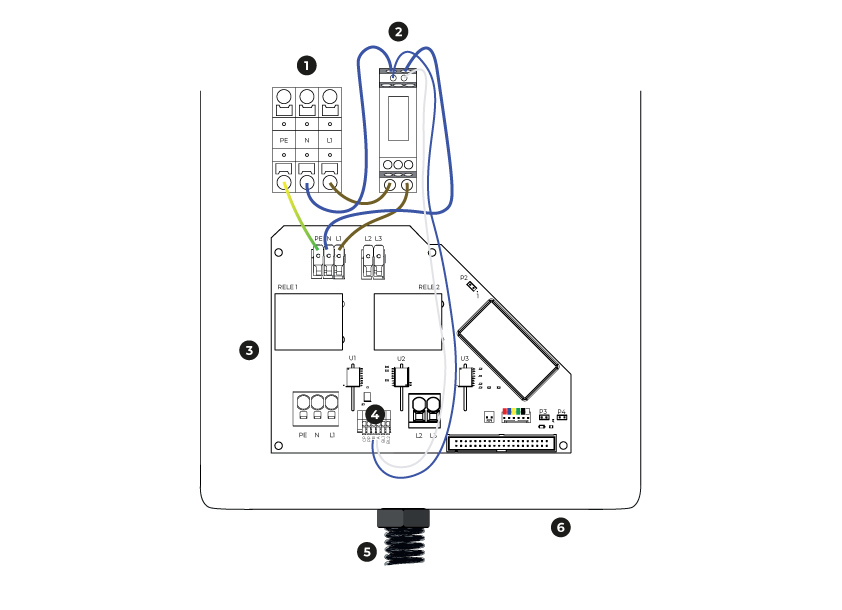

Single-phase installation

MID Meter

Power plate

CON6 (A and B)

Charging cable

e-Charger Housing
2. Modbus Data Connection (RS485)
The meter communicates with the charger via a Modbus RS485 bus. It uses a shielded twisted pair cable (for example, 2 x 0.5 mm² or similar) and keep it away from power cables.
Meter Side
| Meter | RS485 A (+) | RS485 B (−) |
|---|---|---|
| Single-phase (DDSU666) | Terminal 5 | Terminal 6 |
| Three-phase (DTSU666) | Terminal 24 | Terminal 25 |
Charger Side (Trydan and Trydan Pro)
On the charger, connect the meter to the RS485 terminal designated for the MID / Modbus meter. The terminals on the charger are marked as A/B:
- A (+) from the meter to the terminal A (+) of the charger.
- B (−) from the meter to the terminal B (−) of the charger.
As an alternative to the A/B terminals, you can use an RJ45 connector with a custom crimp. Check the details at Modbus RTU Connection of the Trydan with meter as slave.
Recommendations for the Modbus cable
- Always connect A to A and B to B.
- If later the meter does not respond, try swapping A and B: this is the most common cause of communication failure.
- Use a single twisted pair for A and B: one copper conductor for line A and another for line B. Do not join two cables to increase the section.
- Make the cable as short as possible and keep it away from power cables.
- Restore power only after checking all connections.
3. Configuring the MID meter from its screen
Before the charger can read the meter, its address must be configured. The Modbus address of the meter must be 11.
| Parameter | Value |
|---|---|
| Modbus Address (Addr) | 11 (mandatory) |
| Baud Rate (bAUd) | 9600 (factory value) |
| Parity / Data Format | 8N1: no parity, 8 data bits, 1 stop bit (factory value) |
The speed and parity do not need to be changed: the factory values (9600 8N1) are valid. It is only essential to change the address to 11.
General procedure (for both meters)
- Provides voltage. The meter displays the values it measures on the screen.
- Press the ENTER (or SET) key to enter the programming menu.
- The meter asks for a password. The default password is 701: enter it using the arrows and confirm with ENTER.
- Navigate with the arrows to the communication parameters menu.
- Select the Modbus address (Addr), change it to 11 and confirm with ENTER.
- Check the speed (bAUd) and the parity and adjust them according to the table above. Confirm with ENTER.
- Press ESC several times until you return to the measurement screen. The settings are saved.
Single-phase meter (DDSU666)
Follow the general procedure. This meter has a simple menu. After changing the address, the screen should display the value 11 in the Addr parameter.
Three-phase meter (DTSU666)
Follow the general procedure. This meter has more menu options (for example, transformation ratio and connection type):
- Transformation ratio (CT): leave it at 1 (direct connection meter).
- Connection type: three-phase 4-wire.
- Address: 11.
Check the meter
After changing the settings, the meter should continue to display voltage, current, and energy values. If voltage values do not appear, check the electrical connection from section 1.
4. Configuring the Trydan from its screen
These steps are the same for Trydan and Trydan Pro.
- Turn on the charger and wait for the main screen to appear.
- Enter the settings menu by pressing both side buttons at the same time. More information at buttons and display navigation.
- Go to the “Additional” section.
- Select the «MID Meter» option.
- Select the meter model you have installed: “Single-phase” (DDSU666) or “Three-phase” (DTSU666). If there are other compatible models, they will also appear here.
- Confirm the selection and return to the main screen.
If the charger does not have a MID meter, the option “No” must be selected.
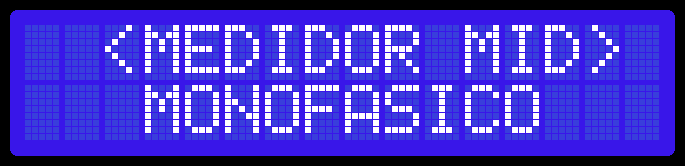
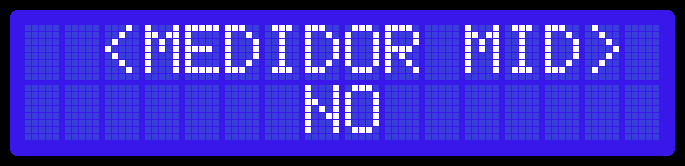
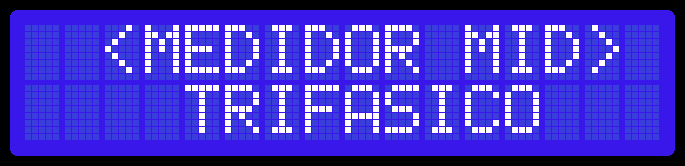
Check that the meter is working
- After a few seconds, the charger should display the energy and power it reads from the MID meter.
- Connect a vehicle (or a known load) and check that the power value changes. The values should be reasonable and have the correct sign (positive when charging).
- If the values are zero or the charger shows a communication error with the meter, refer to section 5.
5. Troubleshooting issues
| Problem | What to check |
|---|---|
| No communication or communication error | Ensure the meter address is 11. Check that the baud rate and parity are factory settings (9600 8N1). RS485 A and B cables: swap them if necessary (disconnect power first). Make sure the correct model (single-phase or three-phase) is selected on the charger display. |
| Negative energy or power | The input and output cables of the meter are swapped: correct them. |
| The meter display is off | No power is reaching the meter. Check the circuit breaker and terminals 1 and 3 (single-phase) or 1, 3, 5, and 7 (three-phase). |
| Incorrect power value in three-phase installation | The phase order L1, L2, L3 and ensure the connection type is three-phase 4-wire. |
Do you need technical support?
Resolve your issue instantly through our AI Chat. If it is not resolved, generate a request in the Technical Support Center and we will contact you as soon as possible to provide you with the best solution.