
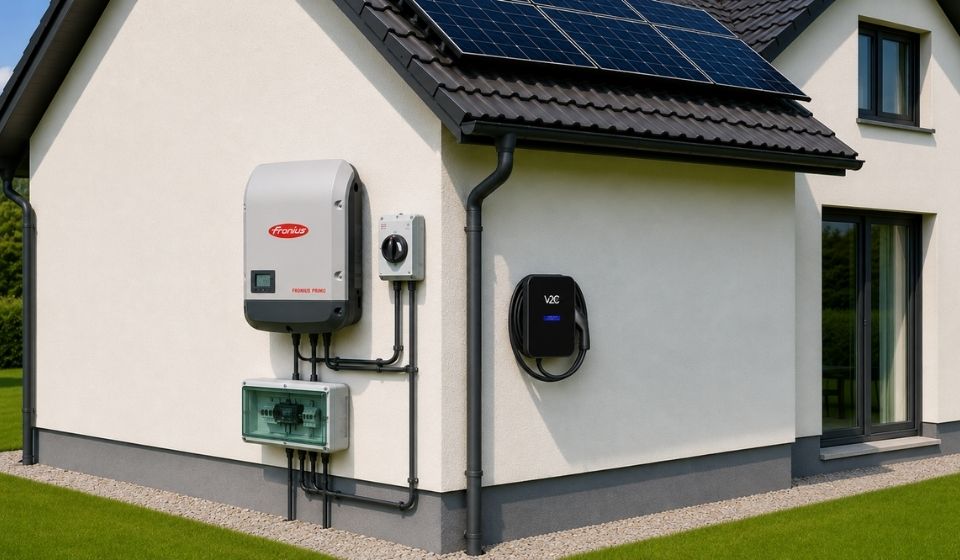
A Fronius photovoltaic system on the roof, an electric car in the garage, and the question of how both work together sensibly. If you want to charge your electric vehicle directly with your solar power instead of feeding it into the grid, you need a wallbox that communicates with the inverter. This is exactly what Trydan, the best-selling wallbox from V2C, does, and it makes the setup particularly easy.
The short answer: The Trydan wallbox from V2C is compatible with Fronius inverters from the Primo and GEN24 series. The connection is made via Modbus TCP in the local network, without additional hardware or cloud connection. PV surplus charging is possible right out of the box.
How to connect a wallbox to the PV system is explained step by step in the overarching guide.
Table of Contents
- 1 Why Fronius Owners Have an Advantage When Charging
- 2 Which Fronius Inverters Are Compatible?
- 3 How PV Surplus Charging Works with Fronius
- 4 Direct Connection, No Additional Hardware Required
- 5 Setup: Connecting Trydan and Fronius
- 6 The Three Charging Modes at a Glance
- 7 Increasing Self-Consumption: What the Combination Brings in Practice
- 8 Is the Combination Worth It? Costs and Amortization
- 9 What About the Fronius Smart Meter?
- 10 No Direct Inverter Connection? The Current Clamp as an Alternative
- 11 EVCC as an Alternative to App Control
- 12 FAQs
- 13 In Summary
Why Fronius Owners Have an Advantage When Charging
Fronius is one of the most widely used inverter brands in Europe, both in private and commercial sectors. If you already operate a Fronius system, you benefit from a mature communication interface: Modbus TCP. This industrial protocol allows the V2C Trydan to communicate in real-time with the inverter, without going through the cloud, without additional hardware.
This means in practice: The wallbox knows at all times how much solar power is being generated, how much the household consumes, and how much power is available for charging the vehicle. This interplay makes PV surplus charging possible, one of the most effective methods to permanently reduce energy costs.
Which Fronius Inverters Are Compatible?
The V2C Trydan communicates via Modbus TCP with Fronius inverters. The following models are compatible:
| Model | Modbus TCP | Note |
|---|---|---|
| Fronius Primo (classic) | Yes | Configuration via local web interface |
| Fronius Primo GEN24 | Yes | Advanced Modbus settings recommended |
| Fronius Symo GEN24 | Yes | For three-phase systems |
| Fronius Symo (classic) | Yes | Configuration via web interface |
| Fronius Galvo | Limited | Older firmware may lack Modbus TCP |
Note: Compatibility requires that Modbus TCP is enabled in the inverter and that both the inverter and the wallbox are on the same local network. The Wi-Fi network must support 2.4 GHz; many Fronius devices connect exclusively via this band.
How PV Surplus Charging Works with Fronius
The principle is simple: The wallbox continuously adjusts the charging power to the available solar surplus. As soon as the system produces more than the household consumes, the excess energy flows into the vehicle instead of being fed into the grid.
The process:
- The Fronius system generates solar power and feeds it into the household network.
- The household consumes part of this energy (devices, lighting, etc.).
- The V2C Trydan reads the feed-in power of the inverter in real-time via Modbus TCP.
- Trydan calculates the available surplus: generation minus household consumption.
- The charging power is automatically adjusted, continuously between 6 A and 32 A (1.4 kW to 7.4 kW in single-phase operation).
- If solar production decreases (e.g., due to cloud cover), Trydan immediately reduces the charging power.
- If production increases again, it increases the charging power accordingly.
Example: On a sunny day, the system generates 6 kW. The household consumes 1.5 kW. Trydan recognizes a surplus of 4.5 kW and charges the vehicle with this power, completely with its own solar energy, without drawing from the grid.
Direct Connection, No Additional Hardware Required
The communication between V2C Trydan and Fronius inverter occurs exclusively over the local home network. No additional gateway, energy management system, or external hardware is needed.
Via Modbus TCP, Trydan reads the following values directly from the inverter:
- Current PV generation power (in W)
- Grid consumption and grid feed-in (in W)
- Household self-consumption (in W)
- Operating voltage and grid frequency
- Operating status of the inverter
This data is updated every second and enables precise, dynamic charging control in real-time.
Setup: Connecting Trydan and Fronius
The setup differs depending on the Fronius model series. Below are the steps for the classic Primo series and the new GEN24 series.
Fronius Primo (classic)
- Connect to the Wi-Fi hotspot of the Fronius Primo. This is usually accessible via the IP address 192.168.250.181.
- Open a browser and enter the IP address.
- Log in with the default credentials: Username admin, Password admin (unless changed).
- Navigate to Communication > Modbus.
- Enable Modbus TCP and note the port (default: 502).
- Ensure that the inverter and Trydan are connected to the same Wi-Fi network (2.4 GHz).
- Open the V2C app, go to Settings > Inverter, and select Fronius.
- Enter the IP address of the inverter and port 502.
- Save the settings – the connection will be established within seconds.
Fronius GEN24 (Primo GEN24 / Symo GEN24)
For the GEN24 series, advanced Modbus settings are required:
| Setting | Value |
|---|---|
| Slave Modbus TCP | Enabled |
| Port | 502 |
| Meter Address | 240 |
| SunSpec Model Type | Float |
| Inverter Control via Modbus | Enabled |
- Log in via Fronius Solar.web or directly via the local IP address of the inverter.
- Navigate to Communication > Modbus/SunSpec.
- Enable Slave Modbus TCP and set the port to 502.
- Set the meter address to 240 and the SunSpec model type to Float.
- Enable Inverter Control via Modbus.
- Save the settings and restart the inverter.
- Then connect Trydan as described above via the V2C app.
Error Code 006: If the V2C app displays error 006, a connection to the Fronius inverter could not be established. In this case, check the IP address of the inverter, whether both devices are on the same network, and whether Modbus TCP is correctly enabled.
The Three Charging Modes at a Glance
The V2C Trydan offers three charging modes that can be used depending on the situation and preference:
| Charging Mode | Description | Ideal for |
|---|---|---|
| Immediate Charging | The vehicle is charged immediately and at maximum power, regardless of solar yield | Fast charging with low battery level |
| Surplus Charging | The charging power is dynamically adjusted to the available solar surplus | Maximum self-consumption, minimal charging costs |
| Time-Controlled Charging | Charging starts at a set time (e.g., at night during off-peak hours) | Cheap night charging, full planning control |
The modes can be switched at any time in the V2C app, even remotely, as long as there is an internet connection.
Increasing Self-Consumption: What the Combination Brings in Practice
Charging your electric vehicle with self-generated solar power saves you money in two ways: The feed-in tariff has decreased significantly in Europe, and self-consumed electricity is economically much more attractive than fed-in electricity.
| Scenario | Annual Charging Consumption | Share of Solar Power | Annual Savings (approx.) |
|---|---|---|---|
| Only Grid Power | 3,000 kWh | 0 % | 0 € |
| With Fronius + Trydan | 3,000 kWh | 60 % | approx. 540 € |
| With Fronius + Trydan | 3,000 kWh | 80 % | approx. 720 € |
Calculation based on an electricity price of 0.30 €/kWh and a feed-in tariff of 0.08 €/kWh.
A self-consumption share of 60-80% is realistically achievable in a typical single-family home with an optimally oriented PV system, provided that the vehicle is charged during the day.
Is the Combination Worth It? Costs and Amortization
The V2C Trydan is available from 769 euros. If you already operate a Fronius system, you do not need to purchase additional hardware; the communication runs directly over the local network.
With an annual savings of around 540 euros (60% solar share, 3,000 kWh annual charging requirement), the wallbox pays for itself in less than two years. Additionally, there may be local incentives or subsidies for the energy transition that further reduce the investment.
The combination of Fronius inverter and V2C Trydan is not only ecologically sensible but also economically attractive.
What About the Fronius Smart Meter?
Good news: A Fronius Smart Meter is not required for PV surplus charging with the V2C Trydan. Trydan reads the necessary energy data directly from the inverter via Modbus TCP; the Smart Meter is not needed for this.
If you already have a Fronius Smart Meter installed, you can of course continue to use it for energy management in the house. However, it does not play a role in communication with Trydan.
This is a significant advantage over other wallbox solutions that rely on proprietary gateways or specific additional hardware: With Trydan, the existing Fronius system is fully sufficient.
MODBUS TCP (DIRECT CONNECTION)
Stable connection
Wireless connection over the local network between Trydan and the Fronius inverter, with no extra hardware.
CURRENT CLAMP (ALTERNATIVE)
Works with any inverter brand
Works independently of the inverter, ideal with older firmware versions or network limitations.
No Direct Inverter Connection? The Current Clamp as an Alternative
Not every Fronius installation can be easily integrated via Modbus TCP – for example, with older firmware versions, network-related restrictions, or complex home installations. In these cases, the V2C Trydan offers a practical alternative: the current clamp.
The current clamp is mounted directly on the household electricity meter or at the main distribution and measures grid consumption and grid feed-in in real-time. Based on this, Trydan regulates the charging power without any connection to the inverter.
Advantages of the Current Clamp:
- Works with all inverter brands and models
- No access to inverter configuration necessary
- Easy retrofitting for existing systems
The current clamp is available as optional accessory for the V2C Trydan.
EVCC as an Alternative to App Control
For technically savvy users, EVCC (Electric Vehicle Charge Controller) offers an interesting alternative to the V2C app. EVCC is open-source software that runs on a local server (e.g., Raspberry Pi or NAS) and controls charging via its own web interface.
EVCC natively supports both the V2C Trydan and Fronius inverters. Configuration is done via a YAML file and allows for advanced automation rules that go beyond standard app functions, such as time-based combination rules or battery prioritization.
EVCC is free but requires basic technical understanding for setup. For most users, the V2C app is the simpler and more convenient solution.
FAQs
Trydan from V2C is compatible with the Fronius series Primo and GEN24. The connection is made via Modbus TCP in the local network, without additional hardware or cloud connection.
Trydan is compatible with Fronius models that support Modbus TCP. This applies to most devices in the Primo, Symo, and GEN24 series. Older models without Modbus support can alternatively be integrated via the current clamp.
No. The connection is made locally via Modbus TCP; a cloud connection or a Solar.web account is not required.
Yes, but the available charging power is correspondingly lower. Trydan dynamically adjusts the power; even in changeable weather, the vehicle charges as soon as a minimum surplus of about 1.4 kW (6 A) is available.
Trydan detects the connection loss and displays error code 006. In this case, charging continues with a predefined standard power or pauses, depending on the setting in the app.
Yes. Trydan functions as a fully-fledged wallbox even without inverter connection. PV surplus charging is an optional feature that can be activated once a compatible solar system is available.
Modbus TCP runs exclusively in the local home network; no external data access is possible. For increased security, it is advisable to protect the network with a strong Wi-Fi password.
In Summary
The combination of Fronius inverter and V2C Trydan is technically mature, easy to set up, and economically attractive. Thanks to native Modbus TCP support, both devices communicate directly with each other, without a gateway, without the cloud, and without additional costs. The result: maximum self-consumption, significantly lower charging costs, and a charging system that intelligently responds to your solar production.
If you already operate a Fronius system, you have already met the technical requirements for optimized charging. The V2C Trydan complements the system as a smart interface between photovoltaic and electric vehicle – reliably, efficiently, and without unnecessary complexity.
Visit the Trydan product page