
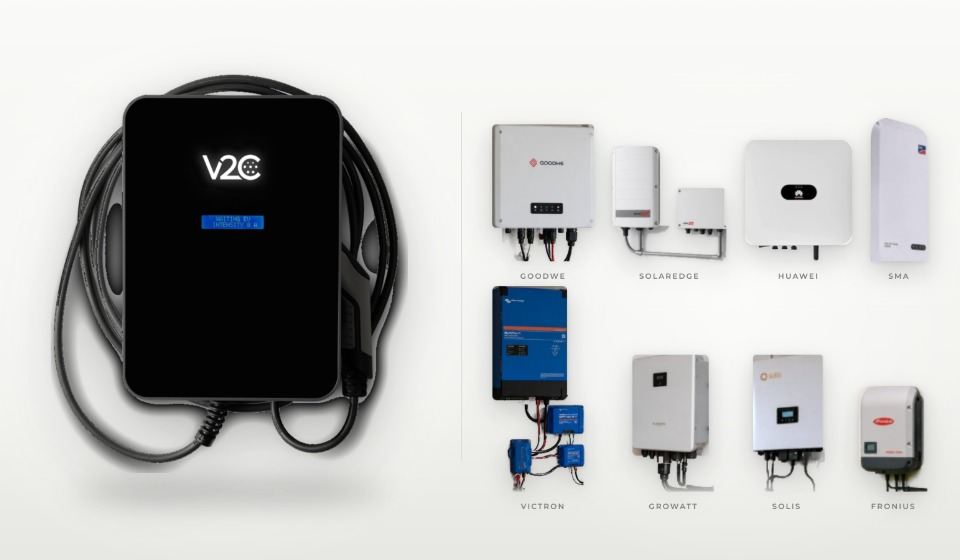
Whether a wallbox is compatible with an inverter comes down to the data interface: the wallbox has to read solar production and household consumption from the inverter in real time, either over the home network via Modbus TCP or through an RS485 data cable. For Trydan, V2C documents a direct connection to inverters from 19 manufacturers, from SMA, Fronius and Huawei to Kostal, Sungrow and SolarEdge, and on to Deye, Enphase and Growatt.
As designers and manufacturers of EV chargers, we set out for each brand the supported series, the connection type and the points where setup can go wrong in practice. If your brand is not on the list, a meter at the grid connection measures the surplus. The ControlBox with a current clamp comes in the box with Trydan.
The short version
- V2C documents a direct connection to inverters from 19 manufacturers for Trydan, each with its own guide in the support area (as of October 2026).
- Most brands communicate via Modbus TCP over Wi-Fi or LAN; Solis and Growatt use an RS485 cable only.
- Series and firmware decide compatibility: GoodWe ET and EH are still in the trial phase, and SolaX requires a specific firmware on the Pocket WiFi.
- With a battery storage system, V2C recommends the direct connection to the inverter; charging the car from the battery is currently possible with Huawei, Sigenergy, Solis, Sungrow and Deye.
- For every other system, a compatible meter measures the surplus: the ControlBox with one current clamp is included with Trydan, and a three-phase supply needs two more clamps.
Table of Contents
- 1 When is a wallbox compatible with an inverter?
- 2 Which inverters connect directly to Trydan? The compatibility list
- 3 How do I connect a wallbox to an inverter: home network or RS485 cable?
- 4 Which wallbox suits my inverter? Checking series, firmware and meter
- 5 How do I pair Trydan with the inverter in the V2C app?
- 6 What if I have a home battery? Charging priority and battery use
- 7 My inverter is not on the list: how do I charge with surplus using a meter and current clamp?
- 8 In short
- 9 FAQs
When is a wallbox compatible with an inverter?
A wallbox is compatible when it can continuously read the performance data of the solar system from the inverter. It calculates the surplus from three values: current production, consumption in the house, and the power flowing to or from the grid right now.
Only with these values can a wallbox regulate solar surplus charging. It raises the charging current as soon as the system produces more than the house uses, and lowers it again when a cloud passes or the washing machine starts. For this, Trydan adjusts continuously between 6 and 32 amps per phase. A wallbox without a data connection charges at a fixed power, whether the electricity is coming from the roof or from the grid. Our guide to charging an electric car with solar panels explains how a wallbox and a solar system work together and which components you need.
There are two ways to exchange data: the direct connection to the inverter or a separate meter at the grid connection. Which one suits you depends on the brand, the series and whether you have a battery.
Which inverters connect directly to Trydan? The compatibility list
The overview covers inverters from 19 manufacturers that V2C documents for Trydan. Click a brand to see the series and devices from its guide, the connection type and the route to setup: three brands have a dedicated step-by-step article, and for the rest there is the guide in the support area. The colour of the dot shows the connection type.
Huawei
Series and devices: SUN2000 series, EMMA
Connection: Modbus TCP over the home network
SMA
Series and devices: Sunny Boy
Connection: Modbus TCP over the home network
Kostal
Series and devices: PIKO, systems with KSEM
Connection: home network (PIKO via HTTP, KSEM via Modbus TCP)
Fronius
SolarEdge
Series and devices: Inverters with a smart meter
Connection: Modbus TCP, port 1502
Sungrow
Series and devices: Models with a LAN port or the WiNet-S module
Connection: Modbus TCP, port 502
GoodWe
Series and devices: ES, EM, BP; ET, EH, BT, BH in the trial phase
Connection: Wi-Fi on the home network
Victron
Series and devices: Systems with a Cerbo GX
Connection: Modbus TCP via the Cerbo GX
Solis
Sigenergy
Series and devices: Sigenergy inverters, including in the SigenStor
Connection: Modbus TCP over Wi-Fi
Growatt
Deye / Turbo Energy
Series and devices: SUN models as listed in the model table in support
Connection: RS485 cable or Wi-Fi via a Solarman dongle
Enphase
Series and devices: Microinverters with an IQ Gateway (Envoy)
Connection: Wi-Fi via the IQ Gateway
SolaX
Series and devices: Models with Pocket WiFi V2, such as the X1-Hybrid G4
Connection: Wi-Fi on the home network
ZCS Azzurro
Series and devices: HYD, 3000 to 6000 series, single- and three-phase
Connection: RS485 cable or Wi-Fi via a Solarman dongle
Sofar
Series and devices: HYD, 3000 to 6000 series, single- and three-phase
Connection: RS485 cable or Wi-Fi via a Solarman dongle
Ingeteam
Series and devices: Ingeteam solar inverters
Connection: Modbus TCP over the home network
SAJ
Series and devices: Models with and without a battery
Connection: Wi-Fi or cable to the system’s Chint meter
Greenheiss
Series and devices: Hybrid models and models without a battery
Connection: Wi-Fi or cable to the system’s meter
This list is based on the integration guides in the V2C support area, as of October 2026. Last checked: 28 October 2026. The list keeps growing: manufacturers without a connection can be suggested through a form in the support area, and V2C reviews the most requested inverters for future integrations.
How do I connect a wallbox to an inverter: home network or RS485 cable?
For twelve of the 19 manufacturers, the connection runs exclusively over the home network, for two by cable only, for three by either route, and for two via Wi-Fi or the system’s meter.
How 19 inverter brands connect to Trydan
Number of manufacturers by connection type according to V2C’s integration guides, as of October 2026
- 12Home network (Wi-Fi or LAN)
- 3RS485 cable or Wi-Fi
- 2RS485 cable only
- 2Wi-Fi or the system’s meter
With a home-network connection, the wallbox and inverter usually exchange data over Modbus TCP, an open industrial protocol. Both devices are on the same network, and the wallbox queries the values at the inverter’s IP address. No extra cable is needed, but the installation spot needs a stable Wi-Fi signal. In most of its Wi-Fi guides, V2C advises against Wi-Fi repeaters and mesh networks, because they can disturb the connection. Reserving a fixed IP address for the inverter in the router stops the pairing dropping after a restart. If the router separates the frequency bands, both devices should work on the same one, most safely the 2.4 GHz network, which some inverters such as Fronius use exclusively.
Two brands depart from the standard: Kostal PIKO delivers its readings through an HTTP query on the home network, and with Enphase, Trydan accesses the data through the IQ Gateway.
If you would rather connect the wallbox to the inverter by cable, you use Modbus RTU over RS485. A network cable runs from the inverter’s communication port to Trydan’s RS485 input, and two wires are used. Router restarts and weak Wi-Fi in the garage do not affect this connection, which is why V2C recommends the cable for Deye, ZCS Azzurro and Sofar. Their Wi-Fi variant needs a Solarman dongle on the inverter. The effort lies in the cable itself: if the inverter and wallbox are far apart, the best time to plan the data cable is during the installation, together with your electrician.
Which wallbox suits my inverter? Checking series, firmware and meter
Within a brand, the series, firmware and accessories decide whether the direct connection works. Five points can be clarified before you buy:
✅ Check before you buy
- Rating plate: manufacturer, series and full model name, for Deye for example SUN-12K-SG04LP3-EU
- Firmware: inverter and communication module up to date, except SolaX, where the Pocket WiFi V2 must be on a version lower than v2.0.33.20
- Smart meter or energy meter at the grid connection: a requirement with Huawei and SolarEdge
- Network: stable Wi-Fi reception at the installation spot and a fixed IP address for the inverter
- Battery storage: a direct connection to the inverter, if Trydan is to use the battery
Some brands have particularities that no general manufacturer list mentions. With GoodWe, Trydan supports the ES, EM and BP series, while ET, EH, BT and BH are still in the trial phase according to V2C. SolaX can only be connected through a Pocket WiFi V2 with firmware lower than v2.0.33.20; V2C’s guide provides the firmware to install on the module. Newer versions cannot be downgraded, and in that case the measurement runs through a wired meter.
V2C describes the Victron connection explicitly for the Cerbo GX; for other GX devices, a quick question to support helps. When connected through the Kostal KSEM, the app does not show solar production, though the charging modes work as usual. And the Solis hybrid model S6-EH1P6K-L-PLUS has its own pin assignment, while all other Solis devices follow the general procedure.
With Sungrow, the route onto the home network depends on the device: models with a LAN port are connected to the router with a LAN cable, and devices without a LAN port need the WiNet-S module on the COM1 connection.
How do I pair Trydan with the inverter in the V2C app?
Pairing is done in the V2C Cloud app under "Dynamic Power Control", once the interface is enabled on the inverter.
Pairing Trydan with the inverter
Process for most brands; Huawei EMMA and Kostal KSEM are set up as a meter
- 1On the inverterEnable the interface: turn on Modbus TCP or connect the RS485 cable
- 2In the routerWith a network connection, note the inverter’s IP address and assign it as fixed
- 3In the V2C appChoose your Trydan, tap the settings icon in the upper right corner and open "Dynamic Power Control"
- 4Select the deviceDevice type "inverter" or "meter" depending on the brand, plus the manufacturer and, with a network connection, the IP
- 5SaveChoose the system configuration, save and set the charging profile
The preparation on the inverter differs by brand. With SMA, the Modbus TCP server is enabled in the inverter’s web interface; with SolarEdge, once in the local portal at 172.16.0.1; with Sigenergy, in the mySigen app; and with Victron, on the Cerbo GX. For cable connections the communication parameters must match, for Growatt for example COM address 1, 9600 baud and 8N1.
After saving, the charging profile decides how Trydan uses the solar power. "Exclusive Photovoltaic" charges only with surplus, "Photovoltaic + Minimum power" adds a fixed minimum power from the grid, and "Grid + Photovoltaic" combines both sources. In solar-only operation, charging starts from around 1.4 kW of surplus on a single-phase and around 4.1 kW on a three-phase connection, matching the minimum charging current of 6 amps.
If power keeps flowing to the grid while you charge, that can be normal: the surplus is below this start threshold or above the car’s charging power, or the home battery has priority. If surplus stays unused for a long time, first check the system configuration and the firmware of the inverter and wallbox.
What if I have a home battery? Charging priority and battery use
In systems with a battery, two Trydan functions control where the solar power goes: the charging priority between the car and the home battery, and the release of the battery for charging the car.
Since firmware 2.5.1, in "Exclusive Photovoltaic" mode Trydan lets you decide whether surplus goes first to the car ("Priority car") or first to the home battery ("Priority home"). According to V2C, this charging priority works with any inverter or meter. If the car is at your workplace during the day, the battery charges first; if it is at home at midday, the car takes precedence. The second function goes a step further: with the "With batteries" option, from firmware 2.5.0 Trydan also charges the car with power from the home battery, in the "Grid + Photovoltaic" and "Photovoltaic + Minimum power" modes. This battery use requires the direct connection to the inverter and is currently enabled for Huawei, also with EMMA, and for Sigenergy, Solis, Sungrow and Deye. Both functions need the V2C app from version 3.2.3.
For hybrid systems, V2C’s photovoltaic integration overview generally recommends the direct connection. In systems without a battery it is not strictly necessary: measuring at the grid connection is enough to regulate the surplus. The settings available are described in detail in our article Trydan and home batteries.
My inverter is not on the list: how do I charge with surplus using a meter and current clamp?
If your inverter is missing from the list, a meter at the grid connection measures the surplus, and solar surplus charging still works. The wallbox then reads the energy flow at the grid connection and regulates the charging current on the same principle.
With Trydan, the V2C ControlBox with one current clamp is included, and with a three-phase connection three clamps are needed, one per phase. Alternatively, Trydan reads compatible meters: over Wi-Fi from Shelly, Wibeee and HomeWizard P1, and by cable from Carlo Gavazzi, Chint, Eastron and Phoenix Contact. Some inverters already come with one of these meters, in which case no further device is needed.
Does Trydan fit your inverter?
Is your inverter on the list but you are unsure of the series, or is your brand missing altogether? A V2C installer can check on site how Trydan would connect to your system: just tell them your inverter model and your electric car. You can find a V2C installer near you.
In short
A wallbox is compatible with the inverter when it can read its measurements over Modbus TCP, RS485 or a comparable interface. Trydan connects directly to inverters from 19 manufacturers, according to V2C, and for every other system the ControlBox in the box, with its current clamp, measures the surplus. See our guide to charging an electric car with solar panels for how the whole system works together.
FAQs
Wallboxes that read production and household consumption from the inverter over an open protocol such as Modbus TCP or Modbus RTU (RS485) are compatible. According to V2C, Trydan connects directly to inverters from 19 brands, including SMA, Fronius, Huawei, Kostal, Sungrow, SolarEdge, GoodWe and Victron.
For Trydan, V2C documents the direct connection to inverters from Huawei, SMA, Kostal, Fronius, SolarEdge, Sungrow, GoodWe, Victron, Solis, Sigenergy, Growatt, Deye/Turbo Energy, Enphase, SolaX, ZCS Azzurro, Sofar, Ingeteam, SAJ and Greenheiss. Which models of a brand are supported depends on the series and firmware.
A suitable wallbox can read the inverter directly or measure the surplus through a meter at the grid connection. For Trydan, the compatibility list shows the series and connection type for each brand. If your inverter is not on it, the ControlBox in the box, with its current clamp, takes over the measurement, and with a three-phase connection two additional clamps are added.
Yes. On compatible models the existing interface is enabled, such as the Modbus TCP server, or an RS485 data cable is run to the wallbox. Replacing the inverter is usually unnecessary. On older devices without a suitable interface, a meter at the grid connection measures the surplus.
Then a meter at the grid connection measures the energy flow. For this, Trydan uses the ControlBox in the box, with its current clamp, or compatible meters from Shelly, Wibeee, HomeWizard, Carlo Gavazzi, Chint, Eastron and Phoenix Contact. Solar surplus charging then works in all charging modes. Charging the car from a home battery, however, requires the direct connection to the inverter.
Several inverter manufacturers offer their own wallboxes, tuned to their own system. Brand-independent wallboxes such as Trydan support many brands through open protocols like Modbus TCP and Modbus RTU. That keeps your options open if you replace the inverter later or expand the system.
V2C recommends the direct connection for systems with a battery. The charging priority between the car and the home battery works with any inverter or meter from firmware 2.5.1. If Trydan is also to charge the car with power from the home battery, the direct connection is a requirement, and this is currently enabled for Huawei, Sigenergy, Solis, Sungrow and Deye.
Three, one per phase. Trydan’s box includes the V2C ControlBox with one current clamp. With a three-phase connection, two more clamps are added.
With Modbus TCP and RS485, the inverter and Trydan exchange the readings directly on the local network or over the data cable. In the network variant, both devices must be reachable on the same network. With Enphase, the login details of the Enphase account are also stored.